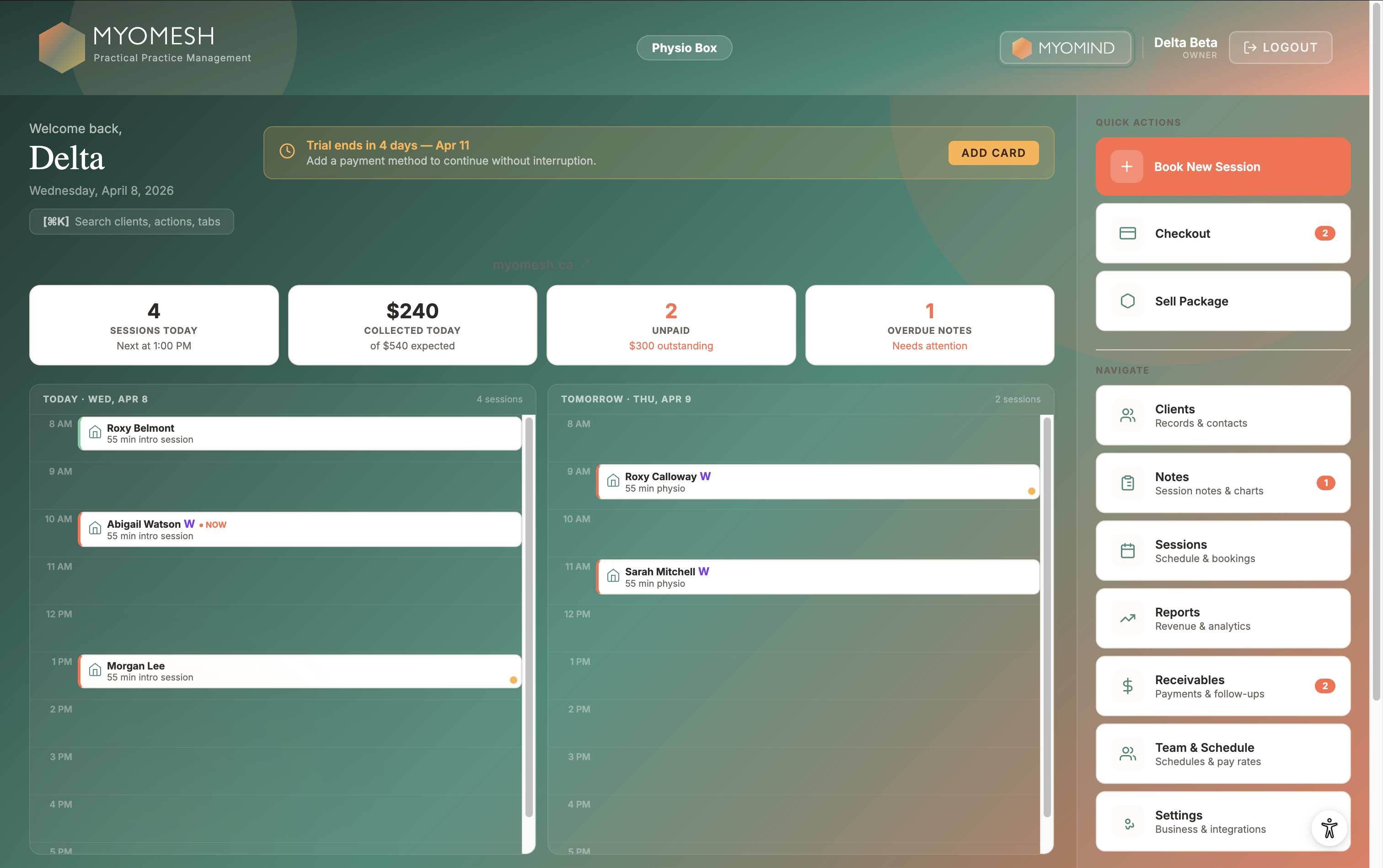
Every practice needs: scheduling, a public booking page, appointment reminders, payment collection, client records, clinical documentation, and digital intake forms. For studios and multi-staff practices, add class scheduling and payroll. AI tools and advanced reporting are worth having but not day-one essentials. For Canadian practitioners, PHIPA compliance and Canadian data residency are non-negotiable.
The essential features - every practice needs these
Regardless of your practice type or size, these are the features that should be in any platform you seriously consider. They cover the core operations of running an appointment-based health practice.
- Appointment calendar with day, week, and month views
- Public booking page - clients book directly without calling you
- Availability management - set your hours, block time off
- Repeat bookings and appointment series
- Calendar conflict detection - prevents double-booking
- Virtual session links (Zoom, Teams, or custom URL)
- Automated email reminders - sent without manual intervention
- SMS reminders - especially important for same-day notifications
- Configurable timing - 48 hours + 2 hours is the evidence-based standard
- Client notification preferences - some clients prefer email, others SMS
- Online payment collection (Stripe integration)
- E-transfer and cash tracking for in-person payments
- Invoices and PDF receipts - sent automatically after payment
- Prepaid session packages - collect upfront, deduct per visit
- Receivables dashboard - outstanding balances at a glance
- Online pre-payment at booking - reduces no-shows
- Client profile with contact details and appointment history
- Session timeline - see every visit in one view
- Health intake data stored with the client record
- Notes and flags visible before each session
All of these in one place - starting at $65/month CAD
See the full
feature list.
View what's included →
Clinical documentation - what's actually useful
Clinical documentation is where practice management software varies most - from basic text notes to structured clinical charting. Here's what's worth looking for:
- Structured SOAP note editor (Subjective, Objective, Assessment, Plan)
- Session history - see previous notes before each visit
- PDF export for referrals and insurance documentation
- Interactive anatomical body chart - mark areas of complaint
- Severity tracking per zone over time
- Visual progress tracking across sessions
A basic text field for notes is the bare minimum. A structured SOAP editor is significantly more useful - it creates consistent documentation, simplifies referral letters, and makes it easier to track progress across sessions. The body chart is valuable for any manual therapy practice where the location of complaint changes session to session.
Intake forms and waivers
Every health practice should be collecting a digital health intake and consent waiver before a client's first visit. Paper forms are slow, hard to store securely, and create unnecessary friction at the front desk. Here's what digital intake should include:
- Digital health intake questionnaire - sent automatically before first appointment
- E-signature consent waiver - legally binding, no paper required
- Client-facing form - accessible on any device, no login required
- Answers stored in the client profile - accessible before each session
- Custom intake questions - add your own questions beyond the standard set
Auto-sending the intake before the first appointment is the feature most practices don't realize they need until they have it. It eliminates the awkward 10 minutes at the start of a first session filling out paper, and means you've reviewed the client's health history before they walk in.
Studio and multi-staff features
If you run a multi-instructor studio or a clinic with multiple practitioners, the base scheduling and payment features aren't enough. These are the additional features that matter:
- Group class scheduling with capacity limits
- Public class booking page - clients browse and book classes online
- Repeating class series - create a weekly schedule without re-entering each class
- Waitlist management - auto-promote clients when a spot opens
- Client check-in and attendance tracking
- Multiple practitioner logins with individual calendars
- Multi-staff calendar view - see all practitioners at once
- Role-based access - staff see only what they need to
- Payroll and commission tracking - calculate earnings per practitioner
- Staff performance reporting
Reporting and business insights
You can't improve what you don't measure. Good reporting doesn't have to be complex - but it should give you a clear picture of how your practice is performing:
- Income dashboard - weekly and monthly revenue at a glance
- Session type breakdown - which services are most popular
- Receivables and outstanding balance reporting
- Product and retail sales reporting
- Staff performance and productivity by practitioner
- Payroll summary export
- Client retention and visit frequency
AI tools - where they add value
AI tools in practice management software have improved significantly. The most useful applications right now are in clinical documentation, not scheduling or billing:
- SOAP note generation from session information - reduces documentation time
- Pre-visit client briefs - summary of the client's history before they arrive
- Body chart trend analysis - identifies patterns across sessions
- Clinical red flag review - surfaces concerning patterns for practitioner review
- Treatment plan generation from SOAP notes
AI SOAP generation is the feature with the clearest and most immediate time savings. Practitioners who document 10–15 sessions per day can reclaim 30–60 minutes. The other AI features - pre-visit briefs, trend analysis, red flag review - are more clinically valuable but require more session history to be most useful.
MyoMesh includes the MyoMind Pulse daily brief with every plan. MyoMind Operator is available for $22/month per user when a practice wants prepared actions and advanced clinical intelligence.
Canadian-specific requirements
For Canadian health practitioners, there are features that aren't optional - they're required for compliance and practical operation:
- PHIPA-compliant data storage - data stored in Canada, under Canadian law
- Data Processing Agreement (DPA) available on request
- E-transfer payment tracking - Canada's most common payment method
- CAD pricing - platforms priced in USD add 30–40% to effective cost
- Canadian tax handling - GST/HST on receipts where applicable
The PHIPA compliance requirement is the one most practitioners overlook until something goes wrong. Using software that stores Canadian patient data outside Canada creates real regulatory risk. For more detail, see our guide on keeping Canadian patient data secure.
Common questions
Practice management software handles the administrative and clinical operations of a health practice - scheduling, client records, billing, documentation, and communication. For Canadian health practitioners, it should also be PHIPA-compliant and support Canadian-specific features like e-transfer payments.
No - modern practice management software integrates scheduling, clinical documentation, and payments in one platform. Using separate tools creates unnecessary complexity and disconnected records. A single integrated platform is simpler, more secure, and usually less expensive than multiple subscriptions.
EHR (Electronic Health Records) software focuses primarily on clinical documentation. Practice management software covers broader operations: scheduling, billing, client communication, and intake - with clinical notes as one component. For most solo and small-group practitioners, an integrated practice management platform with good SOAP note functionality is sufficient.
As a solo practitioner, the essentials are: a public booking page, appointment reminders, payment collection (online and in-person), client records, SOAP notes, and a digital intake form. Group classes, multi-staff calendars, and payroll are only relevant if you have staff or run group sessions.
Every feature on this list.
One platform.
MyoMesh includes everything a Canadian health practice needs - PHIPA-compliant, from $65/month.
See what's included → Start your experience