Yoga studios need scheduling software that handles recurring class schedules, multiple instructors, drop-in and membership pricing, waitlists, and online booking in one place. The right platform reduces front-desk workload significantly and keeps classes full through automated reminders and waitlist management.
Yoga studios operate on a fundamentally different rhythm than 1:1 health practices. The schedule is built around group classes - morning flow, lunchtime yin, evening vinyasa - each with its own instructor, its own style, and its own client base. Managing that schedule well, while also handling memberships, class packs, and the inevitable substitutions and cancellations, is the central operational challenge of running a yoga studio.
The right scheduling software makes this manageable. The wrong choice creates a daily struggle between keeping the schedule accurate, tracking client credits, and managing communication - all before you've taught a single class.
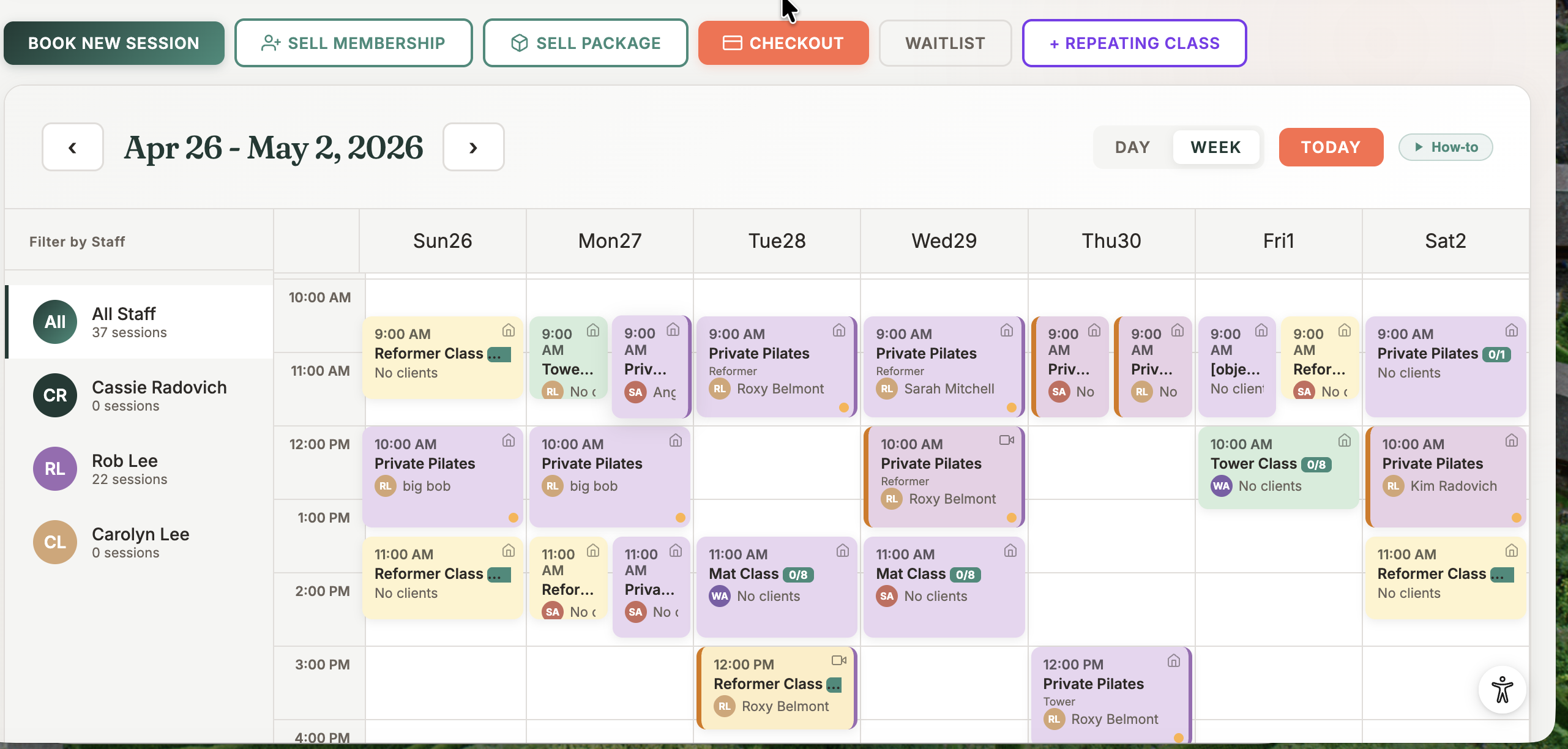
Why scheduling is yoga's biggest operational challenge
A typical yoga studio in Canada might offer 20 to 35 classes per week across two or three rooms, taught by four to eight instructors. Each class has a maximum capacity - usually set by the size of the room and the density appropriate for safe movement. Some classes fill within hours of the schedule dropping; others have open spots until the last minute.
Layered on top of the base schedule are the variables: instructor sick days and substitutions, special workshops that replace regular classes, holiday closures, schedule changes for long weekends. Managing all of this manually - via text messages, Instagram DMs, and spreadsheets - is how studio owners end up working evenings and weekends on admin rather than on their practice or their business.
Core features for yoga studios
- Recurring class templates - Build a weekly schedule once and have it repeat automatically. Adjusting a single class or the whole schedule for a special event should take minutes, not hours.
- Capacity limits - Each class enforces its maximum number of spots. When a class is full, clients can join the waitlist rather than seeing a dead end.
- Online booking - A public schedule that clients can browse and book from, 24 hours a day. This is now a baseline expectation for any yoga studio; clients who can't self-book often go elsewhere.
- Automated reminders - Email or SMS reminder before class, with a cancel link. Reminders sent 24 hours before significantly reduce no-shows.
- Waitlist with auto-fill - When a spot opens, the next person on the waitlist is notified instantly. This keeps popular classes full without any manual intervention.
- Digital waivers - Liability waivers completed online before the first class, stored automatically in the client record.
- Reporting - Class attendance by session, instructor, and time slot. This data tells you which classes to add more of and which to cut or move.
Supporting multiple pricing models
Yoga studios typically offer three pricing structures simultaneously, and your software needs to handle all three cleanly:
Drop-in rates are the most flexible option - a client pays for a single class. Drop-ins work well for travelers, first-timers exploring your studio, and clients with unpredictable schedules. They should also be your highest per-class price, which makes your packs and memberships look like better value by comparison.
Class packs - bundles of 5, 10, or 20 classes - offer a per-class discount in exchange for commitment. The software tracks remaining credits and decrements automatically when a client attends. Setting expiry dates (usually 3–6 months) encourages consistent attendance and protects you from unlimited open-ended liability.
Monthly memberships create the most predictable revenue and the strongest retention. A client who pays monthly develops a habit - yoga becomes a standing part of their week rather than an optional spend. Memberships can be unlimited or capped (8 classes per month, for example), with recurring billing handled automatically by the software.
A clean pricing structure typically looks like this: a drop-in rate that anchors value, one or two class pack options, and two or three membership tiers (perhaps a weekday-only rate, a standard unlimited, and a family plan). Simpler is better - the more pricing options you offer, the more time clients spend deciding instead of booking.
Managing instructors and substitutions
Instructor substitutions are inevitable. The question is how smoothly your system handles them. When an instructor calls in sick at 6am, you need to: find a substitute, reassign the class, notify registered clients that the instructor has changed, and make sure the substitute can see the class roster. With good software, the notification part is automatic once you update the class assignment.
Instructor-specific scheduling also matters for studios where clients have strong preferences - a dedicated ashtanga following, for example, who only attends one instructor's classes. The system should allow clients to filter by instructor and see their specific schedule at a glance.
Class scheduling built for Canadian wellness studios
Recurring classes, waitlists, and memberships:
all in one platform.
See MyoStudio →
Online booking and your studio's digital presence
Your online booking page is often a prospective client's first direct interaction with your studio. Before a new client books their first class, they're evaluating how easy the process is, whether the schedule looks approachable, and whether the studio feels like a place they'd fit in.
A booking page that loads slowly, requires creating an account before browsing classes, or isn't mobile-friendly loses clients before they ever walk in. The baseline standard in 2026 is a clean, mobile-optimized schedule view that lets a client go from discovering your studio to booking their first class in under two minutes.
What to look for when choosing
- Can it handle recurring group classes with capacity limits? - This is the baseline. If yes, continue.
- Does it support drop-in, pack, and membership pricing simultaneously?
- Is the waitlist automated - or do you have to manually notify clients when spots open?
- Are automated reminders included, or charged per message?
- Can instructors view their own schedule and class rosters?
- Is the client-facing booking experience mobile-friendly?
- Is it priced in CAD? - USD pricing adds 30–40% to the effective cost
- Is there a setup fee or annual contract?
Common questions
Canadian yoga studios need scheduling software that handles recurring group classes, capacity management, waitlists, drop-in and membership pricing, and online booking in one platform. MyoMesh MyoStudio is built specifically for Canadian wellness studios including yoga, Pilates, and multi-discipline practices.
Good studio software lets you reassign a class to a substitute instructor and automatically notifies all registered clients of the change. Look for software where instructor assignment is editable per class and where the notification is triggered automatically - not something you have to do manually.
Yes, for any class that regularly fills up. An automated waitlist converts cancellations into filled spots without any manual work. When a booking cancels, the next person on the waitlist is notified automatically and given a window to confirm their spot. This keeps popular classes at maximum capacity and protects your revenue from last-minute cancellations.
Scheduling software built for
Canadian yoga studios.
MyoStudio includes recurring class scheduling, waitlists, membership billing, online booking, and automated reminders - from $95/month CAD with no setup fee.
See MyoStudio See it live - 20 min with Rob