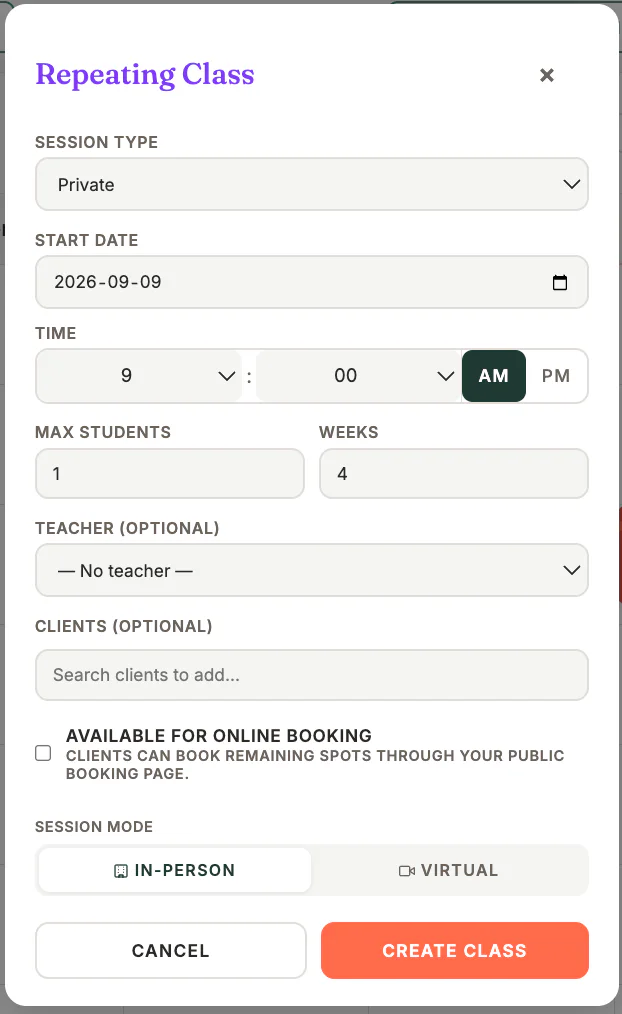
Where to find it
Open Calendar and choose the repeating-session option when creating a session or class.
Step by step
1
Choose the session details
Select the session type, practitioner, location, start time, duration, and client or class settings.
2
Turn on repeating
Choose the recurrence pattern and the number of occurrences or end date.
3
Review conflicts
Check any availability, room, or practitioner conflicts shown before creation.
4
Create the series
Confirm the series and wait for all occurrences to be created.
5
Check the calendar
Review the first and last dates and open a sample occurrence to confirm its details.
Important checks
- Editing or deleting one occurrence may differ from changing the whole series; read the confirmation carefully.
- For classes, confirm capacity and online-booking visibility before publishing.
- Time-zone rules use the business time zone saved in Settings.
Test safely: Use Firebase Dev and Stripe test mode for workflow tests. Do not create live client, payment, package, or membership records just to test a guide.