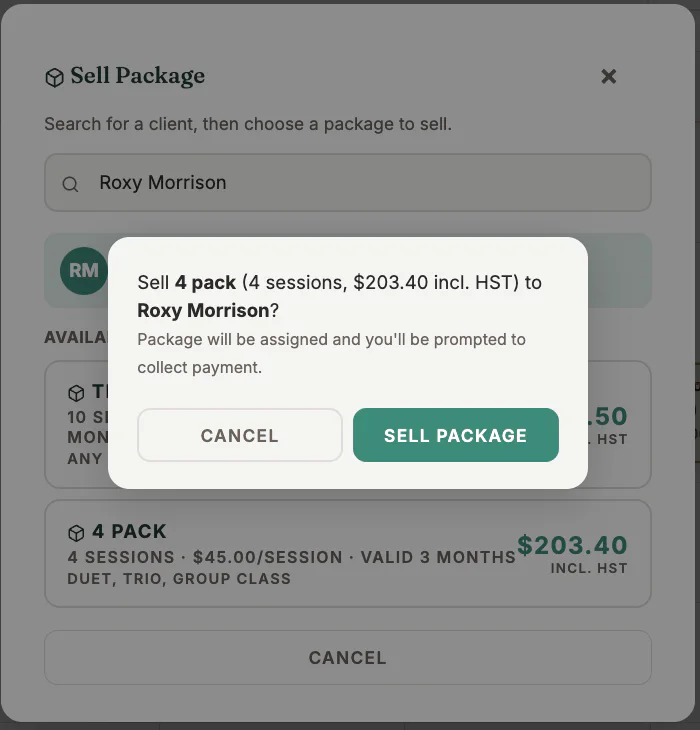
Where to find it
Start from the client profile, a session’s Checkout window, or the package-selling control available to authorised staff.
Step by step
1
Select the client
Verify the client identity before assigning any credits.
2
Choose the package
Review its session count, eligible session types, price, tax, and expiry.
3
Choose collection method
Collect by card, send an invoice or e-transfer request, record cash or cheque, or defer collection where permitted.
4
Confirm the sale
Complete the checkout once and wait for the success message.
5
Review the client profile
Confirm the package, payment state, remaining credits, and expiry date.
Important checks
- Do not repeat the confirmation if the first attempt appears slow; check the client record and Receivables first.
- A deferred or invoiced package is not the same as a paid package.
- Correct mistakes through the authorised correction workflow rather than editing records directly.
Test safely: Use Firebase Dev and Stripe test mode for workflow tests. Do not create live client, payment, package, or membership records just to test a guide.