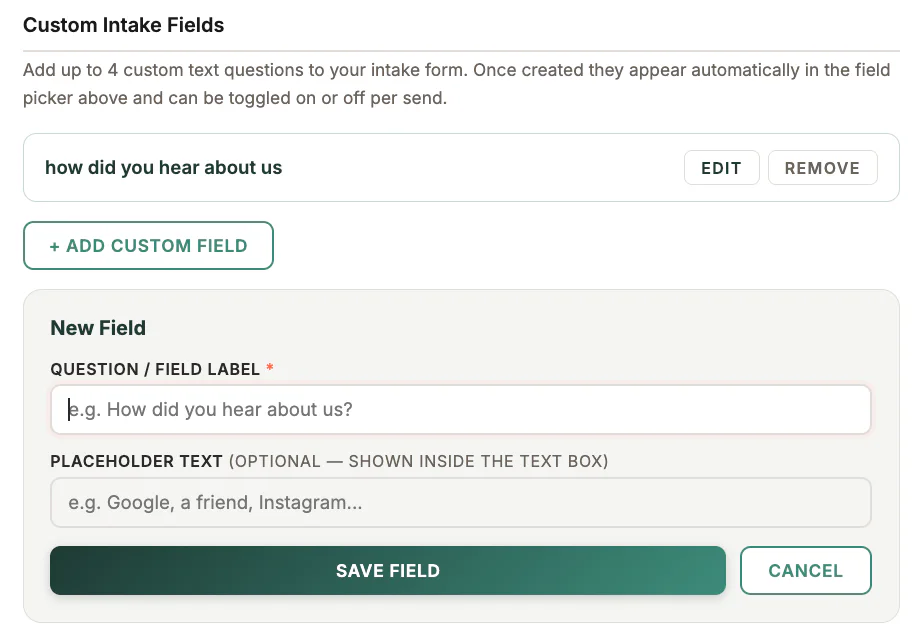
Where to find it
Open Settings, choose the clinical or intake-form section, then find custom intake fields.
Step by step
1
Review the standard form first
Avoid duplicating a question already included in the standard intake sections.
2
Add the question
Use clear client-facing language and avoid asking for information you do not need.
3
Choose the response type
Select the available text, choice, or other field type that best fits the question.
4
Save and preview
Open the intake preview and check the wording on both desktop and mobile.
5
Test with a Dev client
Send a Dev intake link and confirm the answer appears in the intended client record.
Important checks
- Collect only information needed for care or business operations.
- Explain optional questions clearly.
- Changing a question does not rewrite historical responses.
Test safely: Use Firebase Dev and Stripe test mode for workflow tests. Do not create live client, payment, package, or membership records just to test a guide.